Overview: why gnu-radio-4-rc3 matters for home SDR labs
GNU Radio 4 RC3 represents a modernization of the SDR framework that many homebrew operators and laboratory users rely on for spectrum analysis, signal generation, and educational workflows. The RC3 designation signals a release candidate intended to stabilize a new runtime and governance approach while preserving the practical, hands‑on versatility that hobbyists expect from GNURadio. For a 2026 operating environment, the shift toward a refreshed runtime and clearer project stewardship shapes how you build, test, and maintain SDR experiments in a home or classroom lab.
What changed in the 4 RC3 release: practical implications for homebrew and labs
From the perspective of a home lab or small workshop, RC3 introduces a few broad themes that matter in day-to-day workflows. First, a modernized runtime architecture aims to simplify how blocks are loaded, scheduled, and executed. Second, there is a clearer governance model intended to help the community coordinate long-term maintenance, contribution paths, and compatibility expectations. Third, packaging and build expectations are evolving, which can alter how you install, upgrade, and sandbox flows. These changes are not designed to disrupt well-tested experiments, but they do influence upgrade planning, dependency management, and how you validate a working system after updates.
In practice, you should expect: a more modular flow where blocks and drivers connect through a more defined runtime interface; updated Python integration that supports current scripting workflows while requiring mindful version control; and a focus on reproducibility so that flowgraphs behave consistently across reconstructs of the runtime. It is prudent to consult the official RC3 notes for any API boundaries that may affect custom blocks or wrappers you’ve written for your lab setup.
Getting started in a homebrew or lab environment: a careful upgrade path
Upgrading to gnu-radio-4-rc3 in a home or lab setting should be approached methodically. Start by establishing a controlled test environment separate from your primary workstation or production lab machines. This minimizes unplanned disruptions to ongoing experiments while you verify the RC3 changes against your existing flowgraphs.
- Review the RC3 release notes and the community stewardship guidance on the GNURadio site to understand the scope of changes and supported platforms.
- Set up a virtual environment or a clean container to install the RC3 runtime and associated components. This makes it easier to revert if needed.
- Back up your legacy flowgraphs, custom blocks, and any scripts that drive your SDR workflows. Label versions clearly so you can compare behavior after the upgrade.
- Install a minimal, working example flowgraph (for example, a simple signal source feeding a spectrum or FFT sink) to establish a baseline before transitioning more complex setups.
- Gradually migrate larger projects, validating each stage with a controlled test signal, a known reference waveform, or a calibrated measurement.
Because RC3 releases are candidate releases, plan for iterative refinements and keep your original environment accessible. If you rely on third-party modules, verify compatibility with RC3 and be prepared for wrappers or adapters to bridge API changes. The goal is to reach a reliable, reproducible baseline in the RC3 environment before integrating more ambitious experiments.
Workflow patterns in GR4 RC3 for SDR and spectrum analysis
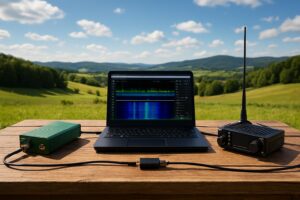
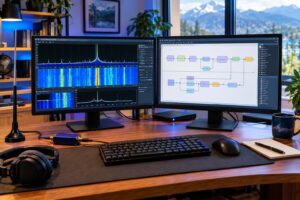
In a typical home lab or school bench, a GR4 RC3 workflow for spectrum analysis might involve a signal source or a real hardware front end, a signal chain defined in GNU Radio Companion (GRC) or Python, and visualization or logging blocks. Here are representative patterns you can adapt without assuming specific hardware:
- Signal capture and display: Source block (digital or real hardware) → FFT sink or QT GUI time/frequency display → optional demodulation or envelope detection for analytics.
- Spectrum-centric investigation: Use an FFT or spectral analysis chain to measure noise floors, dynamic range, or interference patterns across bands. Capture traces for later comparison across RC3 revisions.
- Python-driven automation: Write wrapper scripts that instantiate the flowgraph, kick off measurements, and log results to a CSV or database for trend analysis in your lab notebooks.
- Measurement routines: Build repeatable test sequences for calibrating gain stages, monitoring SWR proxies, or validating front-end response to swept tones, all within the RC3 runtime’s expected interfaces.
These patterns emphasize repeatability, traceability, and safety. They rely on a disciplined approach to configuring blocks, input sources, and sinks while keeping the flowgraph readable and auditable for future RC3 iterations.
Migration tips: compatibility, testing, and verification
Migration is a matter of compatibility, not a single leap from one API to the next. Consider these concrete steps to improve success with gnu-radio-4-rc3:
- Compatibility assessment: Inventory all custom blocks, Python scripts, and external drivers used in your flows. Document the expected input/output types, sample rates, and data formats.
- Version controls and baselines: Keep a repository of working flowgraphs with clear version tags. Maintain a separate branch or directory for RC3-based experiments to prevent accidental overwrites of legacy experiments.
- Incremental testing: Move from simple to complex projects. Validate each block’s connectivity and timing on the RC3 runtime before introducing non-deterministic elements like live RF sources.
- Dependency hygiene: Confirm Python versions, libraries, and hardware interface drivers are compatible with RC3. Where practical, lock dependencies to known-good versions to minimize drift between machines.
- Documentation alignment: Update inline comments and flowgraph documentation to reflect RC3’s runtime expectations. This helps future you and any collaborators understand the changes that were necessary for RC3 compatibility.
By adopting a careful, documented migration approach, you can preserve the value of your existing SDR experiments while taking advantage of RC3 enhancements. The ultimate aim is stable, reproducible experiments that can be revisited years from now in a consistent environment.
Safety, regulatory considerations, and best practices
Regardless of software updates, safety and compliance remain essential. When working with RF equipment and spectrum analysis tools, observe standard lab safety practices, including proper handling of RF shields, power supplies, and antennas. RF exposure guidelines and licensing privileges vary by jurisdiction; ensure you operate within the legal limits and follow local rules for your band, amplitude, and intended use. Documentation of test procedures and measurement results is especially valuable for traceability and compliance in educational or research settings.
In the software domain, practice responsible computing: run in isolated environments when possible, back up configurations, and validate that the RC3 runtime does not inadvertently alter devices connected to your test bench without explicit user action. Keeping a well-organized test plan helps prevent accidental misconfigurations that could affect measurements or damage equipment.
Troubleshooting and validation: a practical checklist
When RC3-based experiments don’t behave as expected, a structured approach helps isolate the cause. Consider this quick checklist as a starting point:
- Confirm RC3 installation location and environment variables. Verify that the runtime path points to the RC3 components you intend to use.
- Run a known-good, minimal flowgraph to establish a fresh baseline. Then incrementally reintroduce complexity to identify where behavior diverges.
- Check compatibility of custom blocks and wrappers. If a block references an API that RC3 has altered, consult the updated block interface and adjust call signatures accordingly.
- Validate input sources and sampling rates. A mismatch in sample rate can lead to unexpected results or timing issues in the flowgraph.
- Review error logs and enable verbose debugging where available. Incremental logging can reveal when a particular block or driver fails or returns unexpected data.
- Document any environment changes. Keeping a running log of RC3-related adjustments helps with future upgrades and other users in your lab or club.
If issues persist, leverage the community resources and release notes to identify whether there are known RC3-specific quirks or recommended workarounds. The aim is to reach a stable configuration that you can rely on for ongoing spectrum work and experiments.
FAQ: common questions about gnu-radio-4-rc3 in home labs
Q: Is gnu-radio-4-rc3 backward compatible with my old flowgraphs?
A: Compatibility depends on the blocks and wrappers you use. Some legacy components may require updates or adapters. Plan for a staged migration and keep old flowgraphs archived as a fallback.
Q: Do I need new hardware to use RC3?
A: Not necessarily. RC3 focuses on runtime and software stewardship, but compatibility with hardware interfaces (front ends, drivers) should be verified. If you rely on specialized hardware, check vendor compatibility notes and update paths.
Q: Where can I find RC3 release notes and guidance?
A: Refer to the GNURadio project pages and the linked release notes. Community stewardship notes also provide context on governance and workflow practices for 2026.
Key takeaways for the practical home SDR user
- The 4 RC3 release represents a modernization of the runtime and governance model, with an emphasis on reproducibility and community collaboration.
- Upgrade planning should use a controlled test environment, with incremental migration of flowgraphs and modules.
- For spectrum-analysis workflows, RC3 supports familiar patterns, but you should verify compatibility of custom blocks and Python interfaces.
- Safety, legal compliance, and clear documentation remain essential in both hardware and software aspects of SDR work.
References and further reading
For context on the RC3 release and community stewardship, see the official GNURadio notes and release pages:
GR4 RC3 release notes (GNURadio)
GR4 community stewardship (GNURadio)
These sources provide official context for the RC3 release and guidance on governance and compatibility. Use them to plan upgrades with a focus on safe testing and repeatable results.